If you drive through St. Charles County right now, the growth is impossible to ignore. From the expanding industrial parks near Highway K to the bustling professional complexes, O’Fallon is booming. But behind the doors of many of these rapidly scaling businesses, a quiet crisis is unfolding.
Imagine this: It’s a Tuesday morning. Your logistics team is preparing for their busiest shipping day of the week, or your accounting firm is facing down a major tax deadline. Suddenly, a core server dies. Screens freeze. Phones ring. Operations grind to an absolute halt.
You scramble to call your IT provider. They eventually fix the issue, hand you a massive emergency invoice, and life goes back to normal……..until the next emergency strikes.
We call this the Reactive Spiral. It happens when your technology strategy consists entirely of waiting for things to break and then paying to fix them. And in a high-growth market like O’Fallon, relying on reactive IT is like trying to drive down I-70 with your eyes glued to the rearview mirror.
To break free from the Reactive Spiral, local business leaders are shifting their approach. They aren’t just looking for an IT help desk; they are looking for strategic direction. That’s where a Virtual Chief Information Officer (vCIO) comes in.
What Exactly is a vCIO (And Why It’s Not Just an “IT Guy”)
If you do a quick online search for “vCIO,” you’ll find plenty of generic definitions calling it an “outsourced IT executive.” But for a mid-sized business owner, that definition is frustratingly vague.
A common misconception is that a vCIO is just a glorified account manager or a sales representative in disguise. But the difference between the two is night and day.
The Account Manager vs. vCIO Contrast:
- The Account Manager asks: “What hardware is broken? What software licenses do you need to buy this month?”
- The vCIO asks: “I see you’re opening a second distribution center in St. Charles next year. How do we ensure your network infrastructure scales securely to support that new location without duplicating costs?”
An account manager focuses on transactions. A vCIO focuses on business valuation and growth.
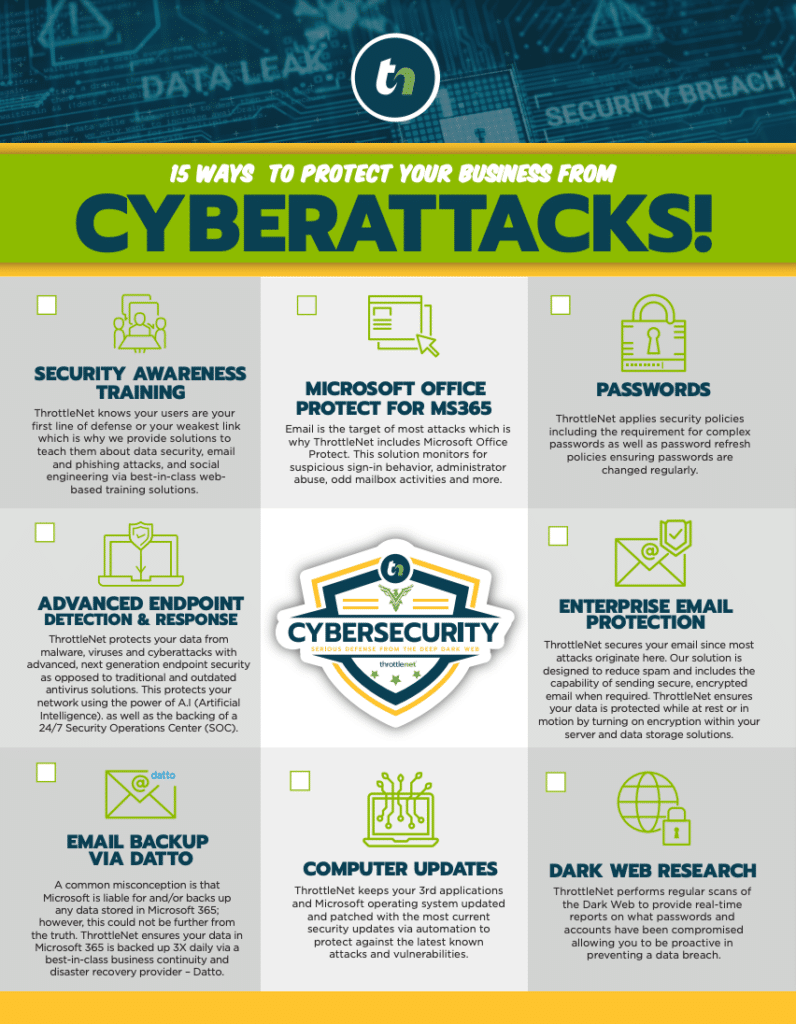
At ThrottleNet, we’ve found that true strategic alignment requires more than just one person having an annual chat with you. That’s why we utilize a dedicated 7-person vCIO strategy group for our clients. Instead of just fixing laptops, your vCIO acts as an extension of your executive board, translating complex technology decisions into predictable financial outcomes.
Escaping the “Reactive Spiral” with the Mechanics of Strategic Budgeting
One of the most dangerous budgeting habits small-to-mid-sized businesses fall into is “The 10% Trap”—simply taking last year’s IT spend, adding 10%, and hoping for the best.
A true vCIO takes a completely different approach, typically breaking your IT budget down into predictable pillars: Keep-the-Lights-On costs, Cybersecurity & Compliance, Strategic Projects, and Disaster Recovery.
Hunting Down “Zombie Costs”
Before plotting out future investments, a vCIO will audit your current environment to eliminate wasted spend. We call these “Zombie Costs” services you are paying for but no longer need.
Consider a 50-person O’Fallon logistics company. During a routine vCIO audit, it’s often discovered that they are paying monthly subscriptions for Microsoft Teams, Zoom, and Slack simultaneously, alongside unused software licenses for employees who left the company two years ago. By simply consolidating these platforms and auditing licenses through a centralized portal, like the TN TechHub dashboard, businesses can often fund their necessary security upgrades using the money they were wasting on Zombie Costs.
The Rolling Replacement Strategy
Have you ever experienced a year where half of your company’s computers died, your main server needed replacing, and your network switches failed all at once? That’s a “panic spend,” and it wreaks havoc on cash flow.
A core function of a vCIO is implementing a Rolling Replacement Strategy. Instead of replacing 100% of your aging hardware in one agonizingly expensive year, your vCIO maps out a visual timeline to replace roughly 20% of your hardware annually. This turns a massive, unpredictable capital expense into a flat, predictable operating expense.
What a 3-Year Technology Roadmap Actually Looks Like
Business owners are constantly told they need a “Technology Roadmap,” but rarely see what one actually entails. A roadmap isn’t just a spreadsheet of computer prices; it’s a living document aligned with your business goals.
Here is what a vCIO roadmap looks like in practice:
- Quarter 1-2 (Stabilization & Security): Moving away from break-fix. Implementing 24/7 proactive network monitoring and deploying next-generation endpoint security. This is where you establish a baseline where IT issues are caught before they cause downtime (at ThrottleNet, this stabilization is what enables our industry-leading 90-second average response time and 93% same-day resolution).
- Quarter 3-4 (Cloud & Collaboration): Migrating legacy on-premise servers to secure cloud environments like Microsoft Azure. This ensures your hybrid workforce can securely access files whether they are in the O’Fallon office or working remotely.
- Year 2 (Compliance & Business Continuity): Deepening disaster recovery plans and ensuring compliance with industry standards (like HIPAA for healthcare or CMMC for manufacturing). This includes backup verification and establishing robust safety nets, such as ThrottleNet’s $500,000 cybersecurity protection program.
- Year 3 (Innovation & Automation): Leveraging AI tools, streamlining workflows, and optimizing systems to outpace local competitors.
You and your vCIO review and adjust this roadmap during Quarterly Business Reviews (QBRs). It’s a dedicated time to look at the horizon, not the help desk tickets.
The IT Budgeting Maturity Model: Where Do You Stand?
To understand where your O’Fallon business is heading, you have to know where you currently stand. Take a moment to evaluate your organization against the four stages of the IT Maturity Model:
- Reactive (The Break-Fix Stage): You have no dedicated IT budget. You only spend money when things break. Productivity is constantly interrupted.
- Proactive (The Managed Stage): You pay a flat fee to an MSP to monitor your systems and keep the lights on. It’s better than reactive, but IT is still viewed as a cost center, not a growth engine.
- Strategic (The vCIO Stage): IT aligns directly with business goals. You have a 3-year roadmap, a predictable budget, and a dedicated vCIO helping you make executive-level technology decisions.
- Innovative (The Market Leader Stage): Technology is your competitive advantage. You leverage data analytics, AI, and enterprise-grade cybersecurity to scale faster than your competitors.
Most growing companies in St. Charles County are stuck somewhere between Reactive and Proactive. A vCIO is the bridge to becoming Strategic.
Frequently Asked Questions (FAQ)
How is a vCIO different from standard Managed IT Services (MSP)?
Managed IT Services handle the day-to-day operations: resetting passwords, patching software, and fixing hardware. A vCIO handles the long-term vision: budgeting, compliance, disaster recovery planning, and aligning technology with your business’s growth trajectory. The best IT setups utilize both—a multi-tiered help desk for immediate support, and a vCIO team for long-term strategy.
Does my business really need a vCIO if we only have 30 employees?
Yes. In fact, smaller, rapidly growing businesses benefit immensely because they usually can’t afford a full-time, six-figure executive CIO. A vCIO provides fractional, high-level executive expertise at a fraction of the cost, ensuring you don’t make expensive, irreversible technology mistakes as you scale.
How does a vCIO help with compliance?
Whether you are a healthcare clinic navigating HIPAA or a manufacturer dealing with supply chain security requirements, compliance is no longer optional. A vCIO tracks regulatory changes, audits your current security posture, implements necessary encryption and access controls, and provides the reporting needed to pass compliance audits seamlessly.
What should I expect during a Quarterly Business Review (QBR)?
A QBR should never be a sales pitch. Expect a high-level review of your IT budget, a progress check on your technology roadmap, a health report on your cybersecurity posture, and a strategic discussion about your company’s upcoming business goals for the next quarter.
Next Steps for Your Business
Scaling a business in O’Fallon requires more than just hard work and a good product; it requires an infrastructure that can handle the weight of your success. If your current IT setup feels like a bottleneck rather than an accelerator, it’s time to rethink your strategy.
You don’t have to navigate complex technology investments, cybersecurity threats, and hardware lifecycles in the dark. By bringing a vCIO into your corner, you transform technology from a frustrating monthly expense into a predictable, measurable driver of business growth.
Ready to see where your business stands? Start by evaluating your current IT budget and asking yourself: Are we spending money to fix the past, or are we investing in the future?